Plan Your AI Video Before You Generate: Storyboard & Animatic First

Plan the AI video before you generate it. A storyboard, and an animatic of those frames, will tell you the film is wrong while the mistake is still cheap. A rendered minute will tell you the same thing after you have paid for it.
This is a planning guide, not a ranking of tools. The product path is script to storyboard, then story to movie. The full order of work, from the first sentence to the cut, is how to make an AI movie.
Why generating first wastes credits
Video credits pay for pixels, motion and time. They do not pay for the decision you skipped. If you generate five versions of a scene because you never decided whether the goodbye should hold or cut, four of those versions were a planning meeting you held inside the model.
Suppose the video is a woman crossing a station to catch someone before the doors close. Generating "a cinematic station" three times will give you three stations. It will not tell you that the crossing, the moment she sees him, and the doors are three different kinds of time. You find that out in the edit, after the credits are gone.
Write the beats down first, including the one that should be quiet. A list with a verb for each beat ("move," "hold," "cut") is enough to stop the next prompt from repeating the same mood.
A cheap planning layer: segments, a shot plan, then an animatic
The cheap layer is three checks, in order. None of them is the finished video.
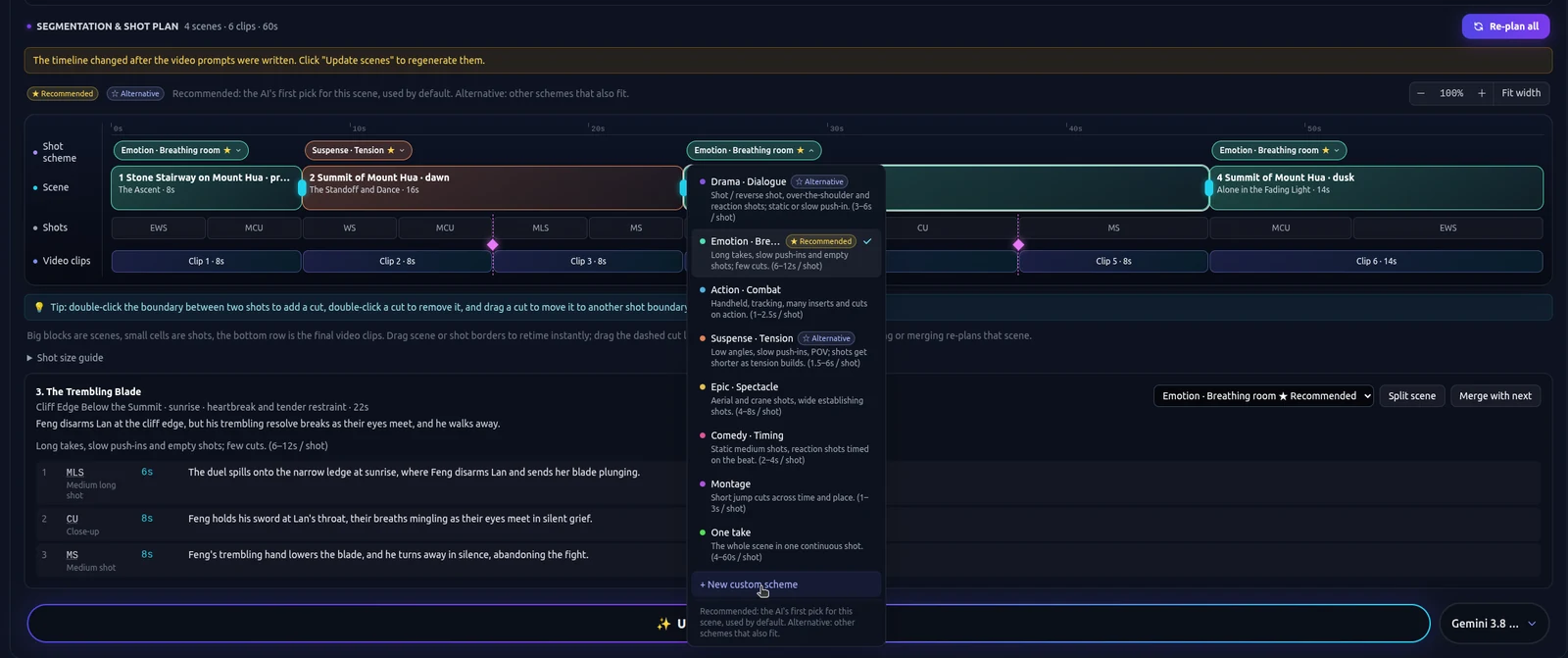
- Narrative segments. Split the script where the story turns, not where a model likes to stop. The crossing, the look, and the doors are three segments.
- A shot plan per segment. The crossing can take a plan that moves. The look can take Suspense. The doors can take Breathing room. Named plans also include Dialogue, Action, Epic, Comedy, Montage and One take, or a custom scheme.
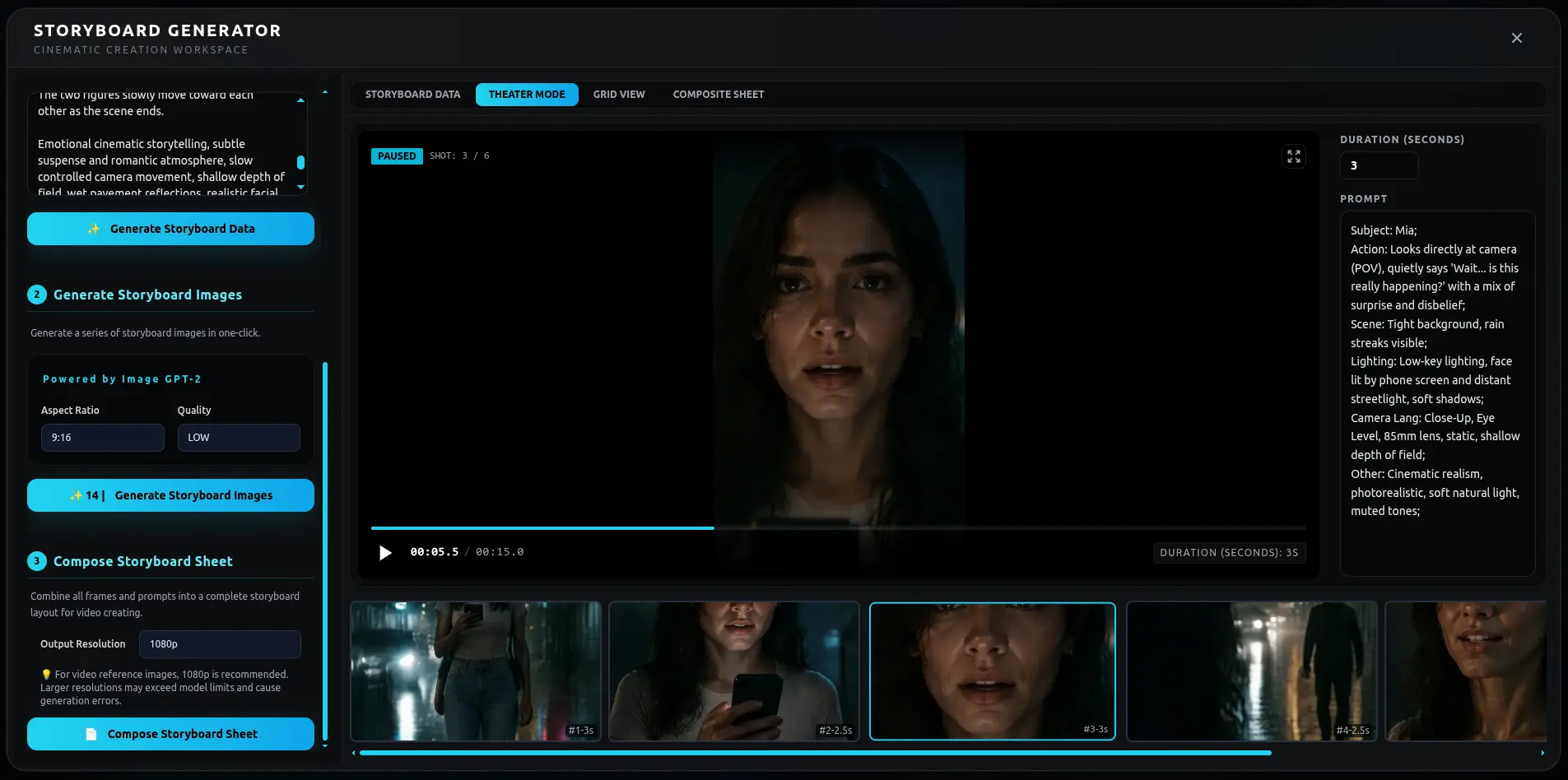
- Frames, then an animatic. Generate storyboard frames from that plan and play them in order before you render every line as video. The storyboard tool includes animatic playback and a storyboard table export. The walkthrough is script to storyboard with AI.
Read the animatic with the sound off. If you cannot tell what changed between the crossing and the doors, the plan is wrong. Fix the segment or the shot plan. Do not "fix" it by generating a more expensive take of the same board.
The storyboard generator is included on every plan, including Free. Frames still spend credits. They spend fewer of them than a full video pass of a plan you have not looked at. This page does not claim the board is zero-cost.
Draft cheap, finish expensive
Once the board is right, the expensive step is the picture. Use a cheaper pass to check rhythm and shots. In Autopilot, Draft is that pass: basic picture and motion, so you can see whether the cuts land. Film grade and Cinema cost more credits and look better. Spend them on the segments you are keeping.
Autopilot shows the credit and time estimate before it runs. You can start with a shorter first part, or switch to the cheaper tier, instead of approving the whole film at the expensive one. It is not an unlimited retry, and it does not upscale on its own. Keep the page open while it runs. Pause it when a shot is wrong, change that segment, and continue.
Step by step works the same way. Generate the segment you are unsure about. Leave the ending alone until the middle is right. Cards show one step. Canvas shows the same project as a graph, so you can see which clip is still waiting on the plan. Double-click a node to edit it as a card.
How TikFilmer splits a story into narrative segments
Paste the script, or a story, or start from one sentence. Pasted text is used as written. A generated story defaults to about 1.5 minutes unless you name another length. TikFilmer proposes narrative segments from that text. Scene headings usually want to become boundaries. You edit the proposal: split a long scene at the turn, or merge two lines that are one beat.
Characters, locations and props are extracted at the same time, each with a reference image. The frames and the later clips reuse those images, so the woman on the platform is the same person in the third segment as in the first. Continuity notes say how one segment should join the next.
If you are still on the pages, the AI screenplay generator is the step before this one. Bring the words here only after they contain the turns you mean to film.
From the plan to a storyboard and a movie
Two pages continue this guide. Script to storyboard is the board: segments, a shot plan, then frames. Story to movie is the rest of the pass, through video and a rough cut.
When the frames match the script, render the segments you kept. The upscaler and the video editor are available after generation, including on Free. The cut should confirm the animatic. If the edit is where you discover the pacing, you skipped this page.
The step-by-step for the whole film is how to make an AI movie.
350 free credits to try the workflow
New accounts start with 350 free credits, issued once. Spend the first ones on the plan: segments, a shot plan, and a board you can watch. A homepage showcase example is about 350 credits for one minute of video at 480p, so a full finish of a longer piece will not fit in the free start. The planning pass is the point of those credits.
Board the script before you render it, or open TikFilmer and paste the beats.
FAQ
What should I plan before I generate an AI video?
The narrative segments, a shot plan for each segment, and storyboard frames you can play as an animatic. Generate video after those three checks, not before.
Is the storyboard or animatic free?
The storyboard generator, including animatic playback, is included on every plan, including Free. Generating frames still uses credits. This page does not claim the board costs nothing.
What does draft cheap, finish expensive mean here?
Use a cheaper pass, such as Autopilot Draft, to check rhythm and shots. Use Film grade or Cinema, which cost more credits, on the segments you are keeping. Autopilot shows the estimate before it spends.
Can I paste a script I already wrote?
Yes. Paste a screenplay, an outline or prose. Pasted text is used as written. TikFilmer proposes narrative segments, and you can change the split before any video is generated.
How many free credits do I get?
New accounts start with 350 free credits, issued once. Use them on the plan and a first look at the cut. A one-minute 480p example on the homepage is about 350 credits, so treat the free start as a test of the workflow.
More articles
View all articles →
Make a Movie with AI
A first film with AI: start from a story or one sentence, keep the cast from drifting, give neighboring scenes different pacing, then reach a rough cut with Autopilot or Cards and Canvas.
Turn a Family Story Into a Movie With AI
A birthday, an anniversary, or a short memoir: paste the words, plan the beats, then take a first cut with Autopilot or repair one beat in Cards and Canvas.
A Cinematic AI Film Workflow
Rhythm for an AI short: story beats, coverage, and a different shot plan for a tense segment than for one that should hold. The beginner how-to is a separate page.
How to Make an AI Movie
The order of work for an AI movie: a story you paste or draft, assets, a shot plan, clips and a rough cut, plus when Autopilot or Cards and Canvas is the better way through it.