Script to Storyboard: Break Your Script Into Segments and Shots
Script to storyboard, in this workflow, is not a straight jump from pages to a shot list. TikFilmer splits the script into narrative segments, you choose a shot plan for each segment, and the frames follow that plan. The board is the film's rhythm made visible, before you spend a render on every line.
Start free in TikFilmer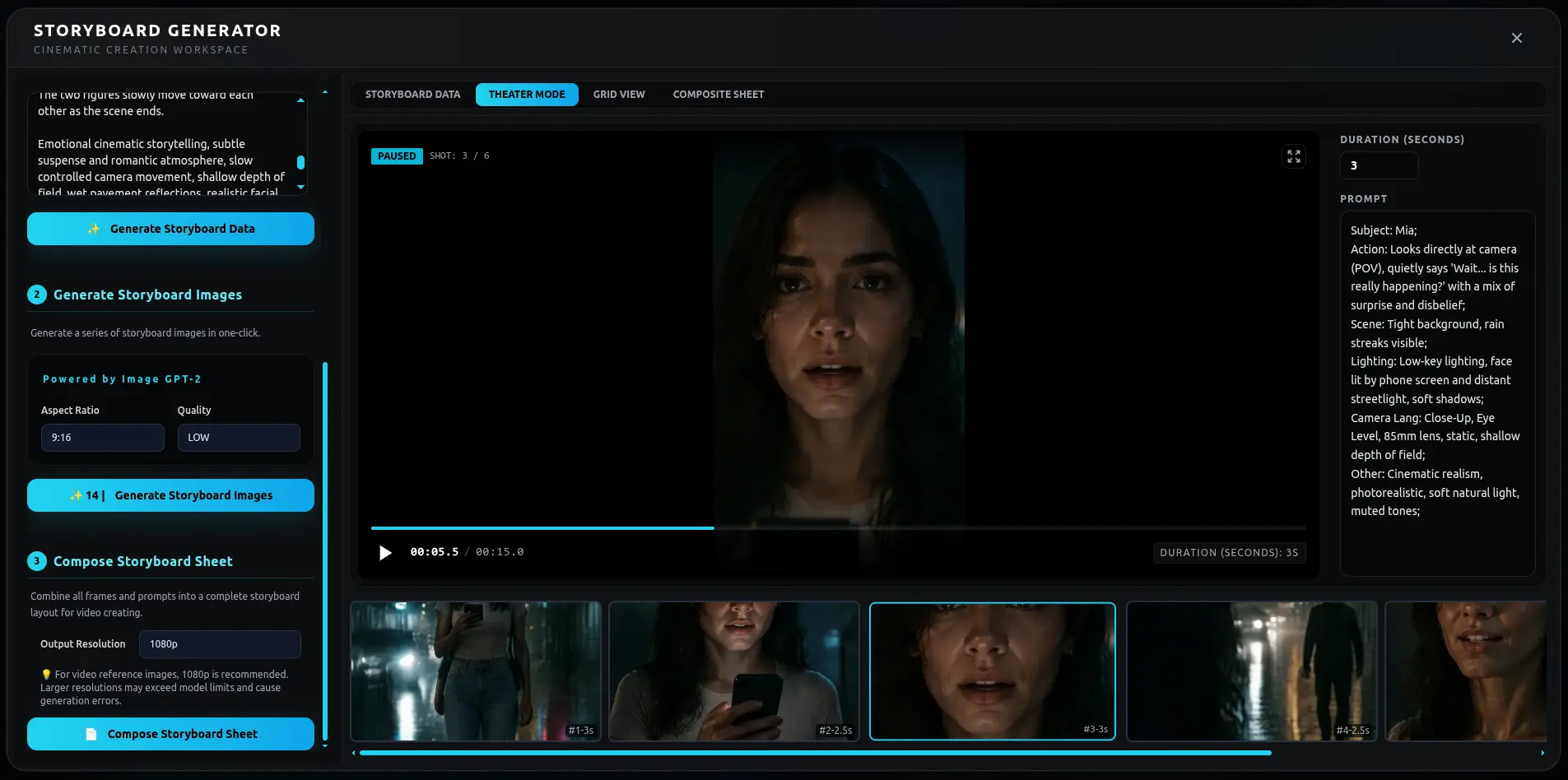
What script to storyboard means
A storyboard is the film drawn as frames, in order, so you can see coverage before you shoot. Going straight from a script to those frames skips the question of which stretch of story is a segment, and how that segment should be paced.
01
Paste the script
A screenplay, an outline or prose all work. Pasted text is used as written. If you only have a premise, a generated story defaults to about 1.5 minutes unless you name another length.
02
Mark the narrative segments
The script is proposed as segments. A scene heading is a hint, not a cage. Split a long scene where the turn is, or merge two short ones that are really one beat.
03
Pick the plan, then the frames
Each segment gets a shot plan. Breathing room holds. A faster plan cuts. The frames are drawn from that plan, so the board already knows where the film breathes.
04
Check faces before you render video
Characters, locations and props keep reference images, and the frames reuse them. New accounts start with 350 free credits, which is a reasonable first board on a short script.
Step 1: split the script into narrative segments
A lot of script-to-storyboard tools read a page and emit a shot. That is useful, and it is also how boards become a stack of equally important frames. TikFilmer puts a segment between the script and the shots. The segment is a stretch of story with its own weight: a place, a turn, a reason to change the pacing.
Say the script is a woman crossing a station to catch someone before the doors close. The crossing, the moment she sees him, and the moment the doors shut are not one segment with twenty identical frames. They are three narrative segments. The first can be longer. The last might be a single held image.
You edit the proposal. The script stays the script. The segments are the reading of it.
Step 2: choose a shot plan per segment
This is the step that sits between "break it into shots" and "draw the frames." For each segment you choose a shot plan. The crossing can take a plan that moves, such as Action. The moment she sees him can take Suspense, fewer shots, closer. The doors can take Breathing room, so the board does not cut away just because a clip model prefers a fixed length.
Named plans include Dialogue, Action, Suspense and Breathing room. Tense, slow and quick are the decisions those names represent. Two boards of the same script can differ here and nowhere else: same person, same station, different narrative style. The frames you get are a consequence of that choice, which is why the choice comes first.
Step 3: frames and consistency
A board that changes her coat, or the platform, has not boarded the script. It has boarded three different films. Before the frames, TikFilmer extracts characters, locations and props and keeps a reference image for each. The storyboard frames reuse those images, and continuity notes say how one segment should join the next.
Generate the frames and read them in order. If a shot is wrong, change that shot. You do not have to redraw the station because one frame missed the bag on her shoulder. The separate storyboard walkthrough, linked below, covers the storyboard tool itself. This page is the segment layer that tool sits on: script, then segments, then a plan, then frames.
Step 4: script to storyboard, then video
The board is a check, not the end. When the frames match the script, each segment can be rendered as video from the same references and the same shot plan. The clips meet in a rough cut. The pacing was chosen when you picked the plan.
If the script is a drama, the drama page is the same idea from the scene side. If you are still on the words, the screenplay page is the step before this one. New accounts start with 350 free credits, enough to board one short script before you render every frame as video.
FAQ
How is this different from turning a script straight into shots?↓
TikFilmer adds a narrative segment between the script and the shots. You choose a shot plan for that segment, including a slower plan such as Breathing room, and the frames follow the plan.
Can I paste a screenplay?↓
Yes. Paste a screenplay, an outline or prose, or start from one sentence. Pasted text is used as written. A generated story defaults to about 1.5 minutes unless you set another length.
Do I see frames before video?↓
Yes. You can generate storyboard frames from the shot plan and check them before you render video. Reference images for characters, locations and props are what keep those frames consistent.
Where do I change the pacing on the board?↓
On the segment. Pick a different shot plan for the segment that should move and the segment that should hold. The frames and the later clips follow that choice.
Is there a walkthrough of the storyboard tool?↓
Yes. The guide linked below walks through the storyboard tool. This page is the planning layer in front of it: segments and a shot plan, then the frames.
Related
- See how an AI short film is planned before any clip is generated
- Write or paste a screenplay, then bring it here to be boarded
- Follow the story all the way from words to a rough cut
- Pace a short drama by choosing a shot plan per segment
- Plan the video before you generate: segments, a shot plan, then an animatic
Script to Storyboard with AI: Guide
TikFilmer AI Storyboard Generator: All-in-One Storyboarding Solution
Board the script before you render it
Paste the script, split the segments, pick a shot plan, and look at the frames before you generate the video.
Start free in TikFilmer